




Here is a scenario most marketers and content creators know too well.
You have ChatGPT open in one tab. Claude in another. Gemini in a third. You are copying text from one, pasting into another, switching back and forth, logging in and out. You are spending more time managing your AI tools than actually using them.
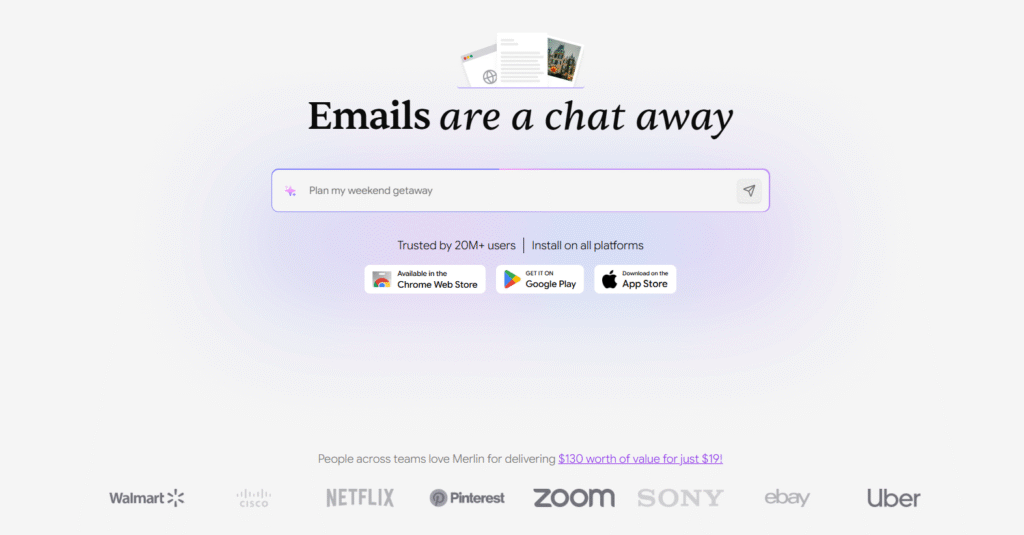
Merlin AI claims to fix exactly that. One Chrome extension. Every major AI model. One keyboard shortcut. Right there on whatever website you are already on.
Sounds perfect. But is it?
In this review we are going to go deeper than the usual “here are the features, here is the price, go buy it” format. We are going to talk about what Merlin actually delivers, what it quietly does not tell you about its pricing, what real users are saying after paying for it month after month, and most importantly — whether it is actually worth your money in 2026.
No sponsored opinions. No copy-pasted homepage content. Just the full, honest picture.
What Is Merlin AI?
Merlin AI is a browser-based AI productivity platform built primarily as a Chrome extension. It was founded in 2021 and has grown into one of the most widely used AI tools for everyday users, marketers, content creators, students, and professionals.
The core proposition is compelling — instead of paying separately for ChatGPT Plus, Claude Pro, and Gemini Advanced which would collectively cost you $60 or more every single month, Merlin gives you access to all of them plus several other leading AI models through one subscription at a significantly lower price.
You install the Chrome extension from the Chrome Web Store. Press Ctrl+M on any website — Gmail, YouTube, LinkedIn, Google, any website at all — and a sidebar opens instantly. From that sidebar you can chat with AI, summarise the page you are on, draft emails, generate social media content, translate text, and much more without ever leaving the page you are currently on.
That workflow integration is what makes Merlin genuinely different from simply opening a new tab with ChatGPT. The tool fits inside your existing workflow rather than interrupting it. For people who spend most of their working day inside a browser, that difference is bigger than it sounds.
Who Is Merlin AI Built For?
Merlin is not a specialist tool. It is a generalist AI assistant built for breadth rather than depth. Here is who genuinely benefits from it.
Content creators and marketers who write emails, social posts, ad copy, and blog outlines daily will find Merlin useful as an always-available assistant that does not require switching tools constantly. If your work lives inside Gmail, LinkedIn, and Google Docs, having AI assistance directly in those platforms is a real productivity gain.
Researchers and students who regularly need to summarise long articles, YouTube videos, research papers, and PDFs without reading everything from scratch will find real value here. The summarisation features are among Merlin’s strongest capabilities.
Freelancers and professionals currently paying for two or more AI subscriptions who want to consolidate into one tool at a lower monthly cost will find Merlin a financially sensible choice — provided they understand the usage caps clearly, which we cover in detail in the pricing section.
Business owners and solopreneurs who want basic AI assistance across writing, research, and communication tasks without committing to expensive specialist tools will find the free plan alone surprisingly capable for light use.
Key Features of Merlin AI
1. Multi-Model AI Access in One Extension
This is the headline feature and the primary reason most people choose Merlin over its competitors. From a single subscription you get access to GPT-4o, Claude 3.5 Sonnet, Gemini 1.5 Pro, Mistral, Llama, and more. You can switch between models depending on what you need for a specific task — different models have different strengths and being able to compare outputs without managing multiple accounts is genuinely useful.
2. The Ctrl+M Browser Integration
Install the Chrome extension and press Ctrl+M on any website to activate Merlin instantly. This works everywhere — Gmail, YouTube, LinkedIn, Twitter, Google Search, news websites, competitor websites, research papers, anywhere. The extension sidebar opens without navigating away from your current page. For heavy browser users this is the kind of tool that quietly becomes indispensable once you have used it for a week.
3. YouTube Video Summarisation
This is consistently Merlin’s most praised feature across every review platform we researched — G2, Capterra, AppSumo, and Product Hunt all cite it specifically. Paste a YouTube video URL and Merlin generates a complete summary with key points and timestamps in seconds. For content creators, researchers, and marketers who consume large amounts of video content for research and inspiration, this feature alone saves significant time every single week.
4. Chat With Websites and PDFs
Open any webpage, research paper, competitor site, or PDF document and ask Merlin questions about it directly. Instead of reading through 40 pages of a report to find three relevant data points, you get specific answers in seconds. This is particularly powerful for competitive research and content sourcing.
5. Direct Platform Integrations
Merlin integrates directly inside LinkedIn, Gmail, and Twitter. On LinkedIn you get AI-powered post generation and reply suggestions right inside the platform itself — not in a separate window. On Gmail you get intelligent email drafting and reply generation that pulls context from the email thread automatically. On Twitter you get tweet and reply generation in multiple tones. These are not surface-level integrations — they are deeply embedded into each platform’s interface in a way that feels genuinely native.
6. Content Creation — Crafts Feature
The Crafts feature inside Merlin’s web app lets you generate code snippets, diagrams, and mindmaps from simple text prompts. This extends Merlin’s usefulness beyond just writing and research into basic technical and visual content creation.
7. Projects — Custom Knowledge Base
The Projects feature allows you to upload your own documents, files, and links to create a custom knowledge base that the AI references when answering your questions. For marketers who want the AI to understand their specific brand, industry, or product context without rewriting prompts every time, this is a useful feature.
8. AI Image Generation
Merlin includes AI image generation on paid plans. It is not its strongest capability compared to dedicated image tools, but it covers basic image generation needs without requiring a separate subscription for users who only occasionally need visuals.
9. 200+ Language Support
Merlin supports content generation and translation across more than 200 languages, making it practical for users creating multilingual content or working across international markets.
10. Security and Compliance
Merlin AI is ISO 27001 certified, SOC2 compliant, and GDPR compliant. Data is encrypted during transmission and the platform does not sell user data to third parties. Users can request deletion of their query history at any time. For business users handling sensitive client information, these certifications matter.
Merlin AI Pricing 2026 — The Full Truth
This is where we need to be more honest than most other Merlin AI reviews out there. Read this section carefully before making any decision.
Free Plan — Genuinely Useful for Light Use
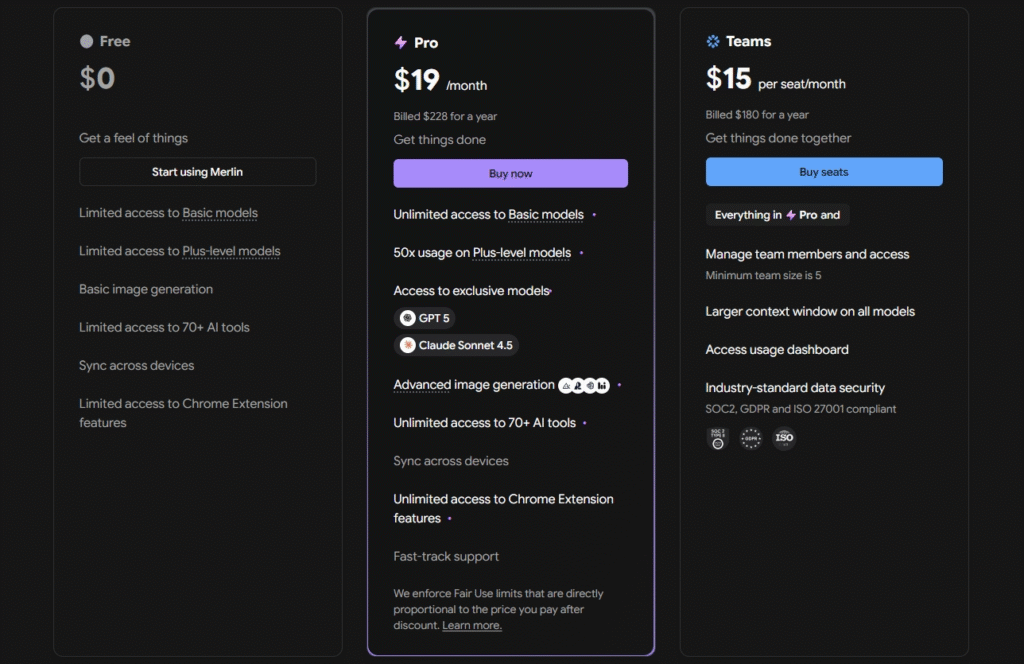
Merlin’s free plan requires no credit card and gives you 102 queries per day that reset every 24 hours. You get access to basic AI models, limited access to advanced models like GPT-4o and Claude, restricted image generation, and most Chrome extension features. For someone who needs occasional AI help throughout the day this is a genuinely functional free plan — more generous than most competitors offer.
The limitation is clear though — power users who rely on premium models like GPT-4o and Claude 3.5 Sonnet heavily throughout the day will hit the free plan ceiling quickly. It is a great starting point but not a permanent solution for heavy users.
Pro Plan — What It Actually Costs
The Pro plan costs $29 per month on monthly billing. On annual billing it drops to $19 per month — a 34% saving compared to the monthly rate. This is important to know because many users sign up monthly, use the tool daily, and then discover they have been paying significantly more than they needed to every single month.
Always choose annual billing if you are committed to using Merlin regularly.
The “Unlimited” Plan — The Catch Nobody Else Explains Clearly
Here is the most important thing in this entire review that no other Merlin review explains honestly.
The Pro plan is marketed as having “unlimited fair access.” In practice this is not truly unlimited. The plan operates on a hidden credit system based on the real cost of the AI models you use. For a full-price Pro account at $19 to $29 per month, the monthly usage cap works out to approximately $100 worth of AI model usage.
If your usage exceeds that threshold your account gets paused until the next billing cycle with no warning sent beforehand. Users have reported discovering their account was blocked mid-project with no notification and no ability to purchase additional credits.
There is a second catch specifically for users who joined on a promotional discount — for example if you got Merlin Pro for $5 per month through a limited-time offer. Their own terms confirm that for discounted accounts the monthly usage limit is proportionally lower. A $5 per month account does not get the same $100 usage cap as a $19 per month account. This frustrated a significant number of early users who felt this was not clearly disclosed at the time of purchase.
For the average daily user — someone writing emails, summarising articles, generating social posts, and doing light research — the $100 monthly cap is unlikely to be a problem. But for power users running Merlin intensively across premium models throughout the entire working day, this cap is real and worth knowing about before you pay.
Teams Plan
The Teams plan starts at $15 per seat per month on annual billing with a minimum of five seats required. That is a minimum monthly cost of $75 per month or $900 per year. It includes everything in Pro plus centralised administration, usage analytics, a larger context window, 50x higher usage limits for premium models, and enhanced security compliance. This plan only makes sense for actual business teams — individual users cannot access it and the pricing structure does not work for solo use.
What Real Users Are Saying in 2026
We went through hundreds of verified reviews on G2, Capterra, AppSumo, and Product Hunt to give you an honest picture of what paying customers actually experience day to day.
The consistent praise centres on three things. First, the browser integration is described repeatedly as the most seamless AI workflow tool users have tried. The ability to get AI assistance without leaving the current page is called out specifically across dozens of independent reviews. Second, YouTube video summarisation gets mentioned by name in a large number of reviews as one of the most practically useful features in the product. Third, the value proposition of accessing multiple premium AI models under one subscription resonates strongly with users who previously managed separate subscriptions.
One Capterra reviewer described Merlin as standing out from ChatGPT specifically because of the Chrome extension and seamless Gmail integration. Another described it as an incredible tool for professional written communication that saves significant time on emails and research tasks.
The critical feedback is equally consistent and worth knowing before you pay. The learning curve is mentioned frequently — the sheer volume of features can feel overwhelming for new users who just want to get started quickly. Users describe spending the first week figuring out what everything does before settling into a natural workflow.
Customer support gets mixed reviews. A significant portion of recent reviewers describe slow responses and difficulties resolving billing issues. For a paid subscription product, inconsistent support is a genuine concern that we cannot ignore.
The unused queries not rolling over is a frustration shared by multiple users. You pay the same monthly amount regardless of how heavily you use the tool that month. During busy periods you may hit limits. During quieter periods your credits expire unused.
Where Merlin AI Falls Short
The “Unlimited” Label Is Misleading
The fair use cap is real and not prominently disclosed during signup. Users who take “unlimited” at face value and use premium models intensively throughout the day will hit the cap and find their account paused without warning. This is the single biggest legitimate complaint across all review platforms.
Customer Support Needs Work
Slow response times and difficulties with billing queries and refund requests appear consistently across recent reviews. For a tool people are paying for monthly, this needs to improve.
Feature Overload for New Users
Merlin has added so many features over time that the interface can feel cluttered and disorienting for new users. The early experience involves a steep learning curve that some users find frustrating compared to simpler alternatives.
No Query Rollover
Unused daily queries expire at midnight and do not carry over to the next day. For users with inconsistent usage patterns this means paying full price for months where they barely use the tool.
Memory Limitations
Unlike ChatGPT’s built-in memory feature, Merlin’s memory system is more limited. For extended conversations requiring deep context, users sometimes find themselves repeating information the AI should already have from earlier in the same session.
Not a Deep Specialist Tool
For very specific advanced tasks — complex data analysis, advanced long-form SEO writing, sophisticated coding workflows — Merlin’s generalist approach means it sometimes underperforms tools built specifically for those tasks.
Is Merlin AI Worth It If You Are Just Starting Out?
This is the question most reviews skip entirely. So here is the honest answer.
At $29 per month on monthly billing — or $19 per month on an annual plan — Merlin is one of the more affordable AI tools available today. And the free plan with 102 daily queries is genuinely functional for light use, not just a token teaser that locks everything away.
When Merlin IS worth paying for right now:
You are currently paying for two or more separate AI subscriptions. If you pay for ChatGPT Plus at $20 per month and Claude Pro at $20 per month, that is $40 per month total. Merlin gives you both models plus several others for less than half that combined cost. The maths here is straightforward.
You spend the majority of your working day inside your browser — writing emails, doing research, managing LinkedIn, creating content. Merlin’s browser-first approach fits directly into that workflow without adding friction.
You need occasional access to multiple AI models without committing to each one individually. The ability to compare outputs from different models for the same task is genuinely useful for marketers and content creators who care about quality.
When Merlin may NOT be worth paying for right now:
You only need AI occasionally and the free plan covers your daily needs comfortably. There is no reason to pay if you are not regularly hitting the 102 query daily limit on the free plan.
You need a deep specialist tool for a specific advanced purpose. Merlin is a generalist. If your primary need is sophisticated SEO content writing, advanced image generation, or complex data processing, a specialist tool will serve you better.
You are on a very tight budget and every dollar matters. Start on the free plan. Use it seriously for two to three weeks. If you consistently find yourself wanting more than the free plan gives you, that is your signal to upgrade. Do not pay before you have confirmed the tool genuinely fits your workflow.
The honest bottom line is that Merlin AI’s free plan is one of the most functional free AI tools available in 2026. And the Pro plan on annual billing at $19 per month offers real value compared to managing multiple individual AI subscriptions separately — provided you go in understanding the fair use cap clearly.
Merlin AI vs The Competition
Merlin AI vs ChatGPT Plus
ChatGPT Plus costs $20 per month and gives you access to OpenAI models only with more developed memory and data analysis features. Merlin Pro at $19 per month annually gives you ChatGPT, Claude, Gemini, and more plus the browser extension. For pure value and multi-model access, Merlin wins. For power users who rely heavily on ChatGPT’s specific memory and advanced data tools, the native platform is still stronger.
Merlin AI vs Monica AI
Monica AI is Merlin’s closest direct competitor — also a browser extension offering multiple AI models in one place. Monica is considered slightly more polished in interface design. Merlin has a more generous free plan. Both are worth trying before committing to a paid plan. If you are deciding between the two, install both free extensions and use them for a week before choosing.
Merlin AI vs Perplexity AI
Perplexity excels at real-time research and web search with live internet access. Merlin covers broader ground including writing, email, social media, and research. If research and fact-finding is your primary use case, Perplexity may serve you better for that specific task. For an all-round daily AI assistant that covers multiple types of work, Merlin is the more complete solution.
Our Verdict — Is Merlin AI Worth It in 2026?
For the right user Merlin AI is one of the best value AI tools available in 2026. The browser extension genuinely works. The YouTube summarisation is best in class for this type of tool. The multi-model access at a fraction of the combined cost of individual subscriptions is a compelling proposition that holds up under scrutiny.
The limitations are equally real. The “unlimited” plan has a $100 monthly usage cap that is not clearly disclosed during signup. Customer support needs meaningful improvement. The learning curve is steeper than it needs to be for a tool with this many features. And the no-rollover query policy means inconsistent users pay full price for months they barely use it.
But here is what makes the decision easy for most people — Merlin AI has a free plan that requires no credit card whatsoever. You install the extension, use 102 queries per day for free, and make your decision based on real experience over one to two weeks rather than anyone else’s opinion.
That zero-risk entry point is what makes Merlin worth trying for almost anyone doing regular content, research, or communication work online in 2026.
Quick Summary
❌ Watch out for: “Unlimited” plan usage cap of $100/month, no query rollover, customer support delays
❌ Not ideal for: Deep specialist tasks, power users who need truly unlimited premium model access
The easiest way to decide if Merlin AI is right for you is to try it yourself — completely free, no credit card needed.
Install the Chrome extension, use the free plan for a week, and see how it fits into your daily workflow. If you find yourself hitting limits regularly and relying on it every day, the Pro plan will pay for itself quickly.