


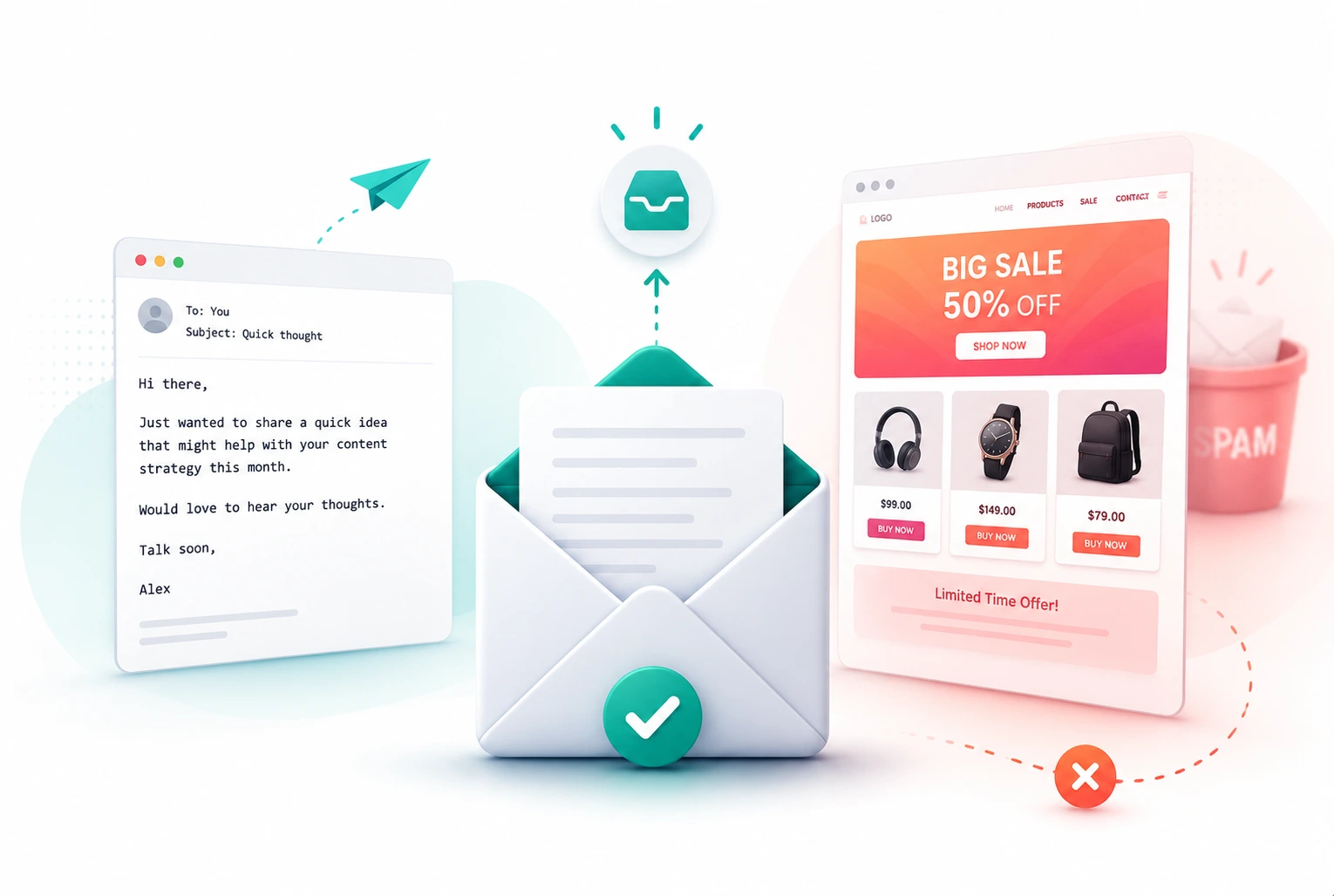
Plain-text emails consistently achieve 42% higher open rates than HTML emails in comparable campaigns, and a single GIF in an otherwise clean email can cut open rates by as much as 37%. Those numbers sound counterintuitive until you understand how modern spam filters actually work.
Most content creators and small business owners start email marketing by reaching for a template. The platforms make it easy. You pick a colour scheme, drop in a logo, add a banner image, choose a font, and hit send. It looks professional. It looks like marketing. And that is precisely why it performs worse.
Email providers like Gmail, Outlook, and Apple Mail have become very good at detecting the difference between a personal message and a mass marketing send. HTML templates, with their images, complex code, and formatted layouts, look exactly like mass marketing sends. Plain-text emails look exactly like a message from a real person to another real person. Spam filters are not trying to block marketing. They are trying to block risk. HTML gives them more material to evaluate. Plain text gives them almost nothing to flag.
This post explains the mechanism behind that difference in plain language, the specific technical settings that protect your deliverability regardless of which format you use, when HTML is actually the right choice, and the practical approach that The Marketing Shelf uses for every email it sends.
How Modern Spam Filters Actually Evaluate Your Email
Modern spam filters do not just look for the word “free” or count your exclamation marks. In 2026, email providers including Gmail, Outlook, and Apple Mail use machine learning systems trained on billions of emails to evaluate dozens of signals simultaneously before deciding whether your email reaches the primary inbox, the Promotions tab, or the spam folder.
What the Filter Is Actually Looking For
The filter evaluates sender reputation, content structure, authentication records, HTML code quality, image-to-text ratio, link patterns, and recipient engagement history all at once. Every one of those signals affects where your email lands. Format is one signal among many, but it is a signal that affects several others simultaneously.
An HTML email with images tells the filter it is looking at a marketing send. That is not automatically a death sentence. It is context. The filter then asks: is this a legitimate marketing send or a risky one? A polished template from a sender with strong authentication, low bounce rates, and consistent recipient engagement passes that check. A polished template from a new sender with no track record, no SPF and DKIM records, and no previous engagement signals from recipients fails it.
A plain-text email, by contrast, skips the marketing context entirely. The filter sees something that looks like a personal message and applies less scrutiny. Apple Mail accounts for 56% of email client usage, and it tends to be more permissive with formatting while rewarding simplicity, according to Sendcheckit’s January 2026 deliverability analysis. Gmail is the more aggressive filter and it sorts HTML emails into the Promotions tab as a default behaviour rather than a penalty.
The Promotions Tab Is Not Spam but It Is Also Not the Inbox
Many marketers treat the Promotions tab as a minor inconvenience. It is a significant deliverability problem. Primary inbox open rates are substantially higher than Promotions tab open rates because most users check their primary inbox multiple times per day and process the Promotions tab occasionally or not at all.
When Gmail sorts your email into Promotions, your campaign does not fail. It just reaches far fewer people than your subscriber count suggests. An email list of 2,000 subscribers where 60% of emails land in Promotions is functionally a list of 800 engaged recipients. Plain-text emails bypass Promotions sorting in the vast majority of cases because they match the signal pattern of personal communication rather than bulk marketing. That alone justifies the format choice for welcome sequences and relationship-building emails to new subscribers.
Why Plain-Text Wins for Most Email Marketing Scenarios
Plain-text emails win on deliverability, open rates, and personal feel for most of the email use cases that content creators and small business owners actually have. The advantage is not marginal. In an analysis of over 1,000 global email campaigns, plain text delivered a 21% higher click-to-open rate and a 17% higher click-through rate than HTML-rich email, according to BillionVerify’s June 2026 analysis of email format performance data.
The Psychology Behind Why Plain Text Converts Better
The reason plain text outperforms HTML is not technical. It is psychological. When someone receives an email that looks like it came from a real person writing specifically to them, they read it differently than when they receive something that looks like a newsletter. The personal framing lowers resistance. It shifts the reader’s mode from passive consumption, which is how they process a newsletter, to active engagement, which is how they process a message from someone they know.
This effect is strongest for new subscribers. The first three to five emails someone receives from you determine whether they develop a habit of opening your emails. Sending a beautifully designed HTML newsletter as email number one signals “you are on a list.” Sending a conversational plain-text message signals “I am talking to you.” The second framing builds the engagement habit that protects your deliverability long-term, because recipient engagement is one of the strongest signals email providers use to evaluate your sender reputation.
When the Simplicity Compounds into Better Results
Better deliverability means more messages land in the primary inbox. More primary inbox placement means higher open rates. Higher open rates improve your domain reputation with email providers. Better domain reputation further improves deliverability. The whole chain compounds, and it starts from the format choice, according to Kalungi’s June 2026 analysis of plain-text email deliverability mechanics. The effect is strongest for cold outreach and early-stage nurture sequences where you are trying to establish a relationship with someone who does not yet know your brand well.
For The Marketing Shelf, every welcome email and every personal recommendation email goes out as plain text. The reasoning is simple: these emails are trying to build a relationship, not showcase a brand aesthetic. The aesthetic can come later. The relationship has to come first.
When HTML Is Actually the Right Choice
Plain text is not the answer to every email marketing scenario. There are specific use cases where HTML is not just acceptable but genuinely better, and treating plain text as a universal rule ignores the nuance that makes email strategy effective.
E-Commerce Product Emails and Promotional Campaigns
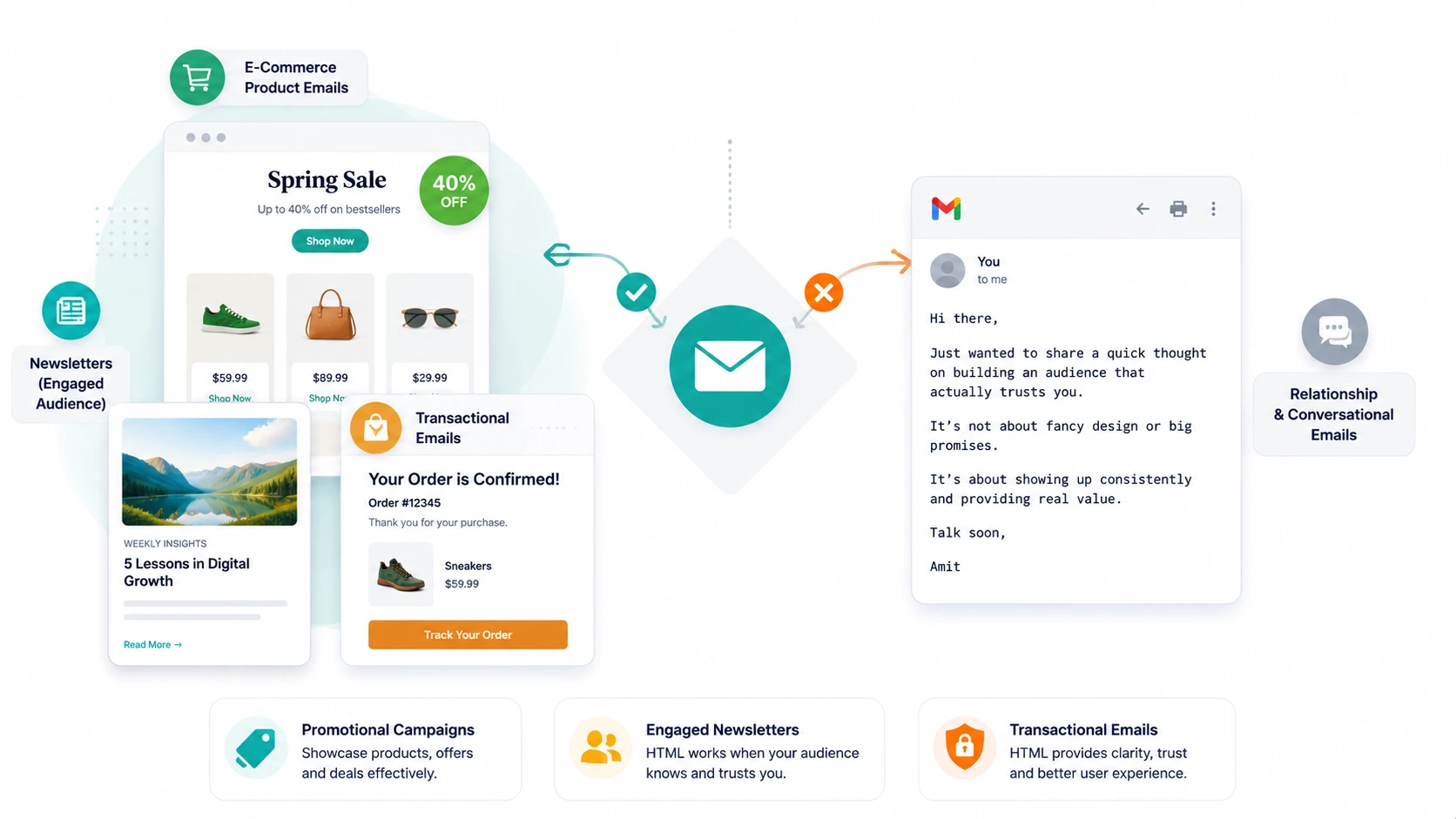
If you are running an e-commerce store and you are sending a seasonal sale email featuring five products with images, pricing, and a buy button, HTML is the right format. A plain-text email listing product names and prices without images creates a clunkier experience than a clean HTML layout. The reader expects visual product presentation in a shopping context, and delivering it does not hurt deliverability as long as the technical setup is correct.
The key distinction is context. E-commerce customers know they are on a commercial list and expect marketing emails. The Promotions tab is not a significant problem for an audience that specifically signed up to receive sale notifications. The visual richness of HTML is an asset in that context rather than a liability.
Newsletters With Established Engaged Audiences
A newsletter with a consistently engaged audience, meaning recipients who open regularly and click through frequently, has the sender reputation to support HTML formatting. Strong engagement signals tell Gmail and Outlook that this is a trusted send that recipients want. The Promotions tab sorting that would penalise a new sender’s HTML email is far less likely to apply to a newsletter that has maintained strong engagement metrics for months.
The practical test for whether your newsletter can support HTML is straightforward. Check your average open rate over the last 90 days. Above 30% for a content newsletter means your sender reputation is strong enough to carry light HTML formatting. Below 25% means you should default to plain text until engagement improves.
Transactional Emails – Always HTML
Password resets, order confirmations, shipping notifications, and account verification emails should always be HTML. These emails serve a specific functional purpose, the reader is expecting them, and the formatted structure makes the key information, a button, an order number, a tracking link, easier to find quickly. Nobody finds a plain-text password reset link more trustworthy than an HTML one with a clear button.
The Technical Settings That Actually Keep You Out of Spam
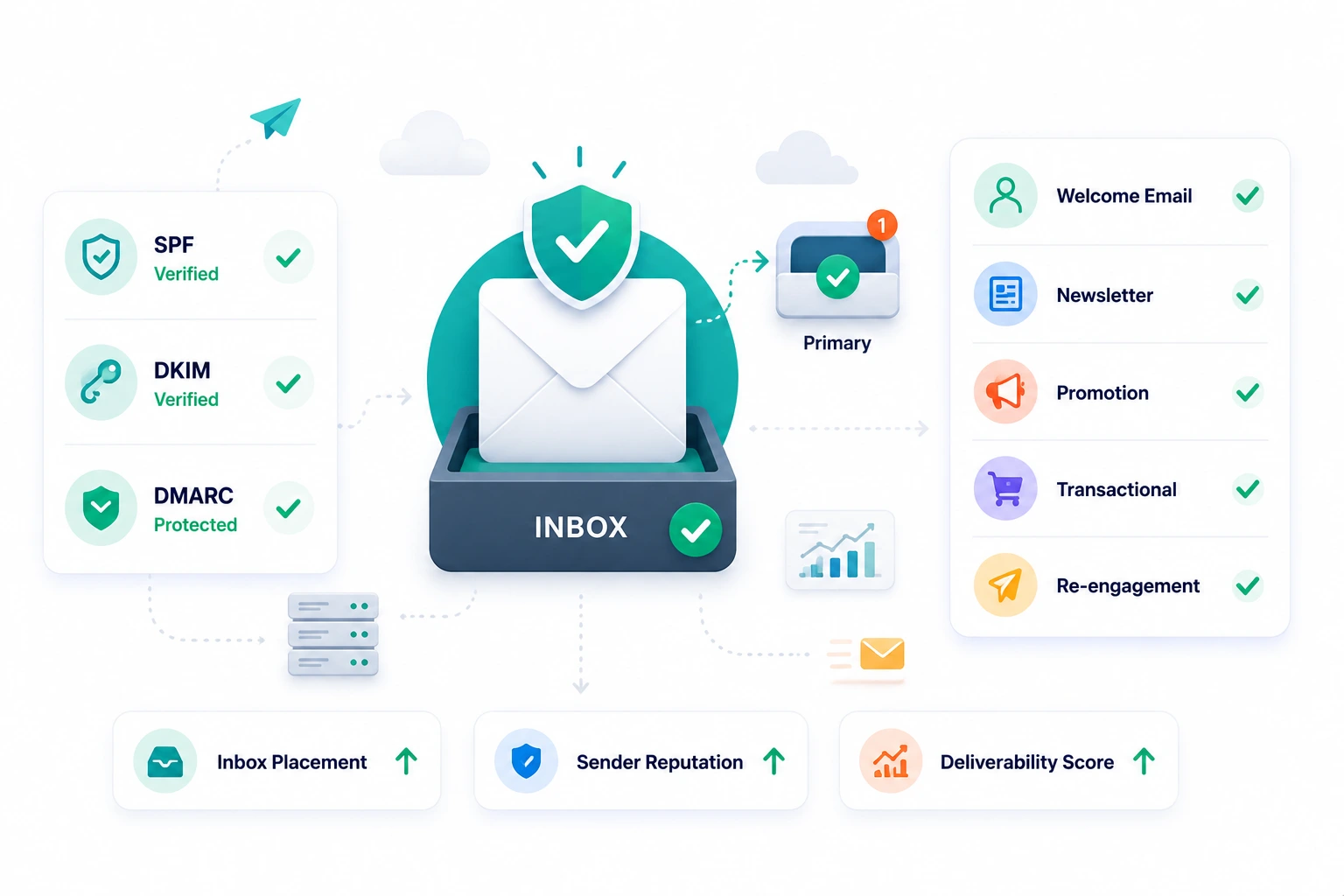
Format is one deliverability signal. The technical authentication layer is a more fundamental one. An email with perfect plain-text formatting but missing SPF and DKIM records will still land in spam. Getting the technical foundation right is the non-negotiable prerequisite for every deliverability strategy.
SPF, DKIM, and DMARC – What They Are and Why They Matter
SPF stands for Sender Policy Framework. It is a DNS record that tells email providers which servers are authorised to send email from your domain. Without it, any server can claim to be sending from your domain, which is a major spam signal. Setting up SPF takes ten minutes and is done through your domain registrar’s DNS settings.
DKIM stands for DomainKeys Identified Mail. It adds a digital signature to every email you send that proves the message was not tampered with in transit. Email providers use DKIM to verify that the email claiming to come from your domain actually came from a server you authorised. Every major email platform, Brevo, MailerLite, ConvertKit, and others, provides the DKIM records you need to add to your DNS when you set up your sending domain.
DMARC stands for Domain-based Message Authentication, Reporting, and Conformance. It tells email providers what to do when an email fails SPF or DKIM checks. A basic DMARC record set to monitoring mode gives you visibility into any unauthorised sending from your domain without affecting legitimate emails. Moving to a stricter DMARC policy over time further protects your sender reputation.
If you have not configured all three for your sending domain, do that before anything else. Format choices are irrelevant if your authentication is missing, because a failed authentication check is a harder spam signal than any formatting issue.
List Hygiene – The Slow Deliverability Killer Nobody Talks About Enough
Sending to subscribers who never open your emails is one of the most damaging things you can do to your deliverability. Email providers track what percentage of your emails get ignored by each recipient. A consistently ignored sender looks, from the filter’s perspective, like someone sending unwanted content. That pattern damages your sender reputation gradually and consistently.
Clean your list every 90 days. Remove subscribers who have not opened any email in the last six months. Before removing them, run a re-engagement sequence: one email asking if they want to stay on the list, with a clear option to unsubscribe. Those who do not engage with the re-engagement email come off the list. A smaller list of genuinely engaged subscribers delivers better results than a large list full of disengaged contacts who are quietly damaging your sender reputation.
Multipart MIME – The Format Setting Nobody Configures
Multipart MIME is a technical email setting that sends both a plain-text version and an HTML version of the same email simultaneously. The recipient’s email client displays whichever version it prefers. Email providers use the presence of a plain-text version as a signal that the sender is following basic email best practices.
Sending HTML without a plain-text alternative is a mild spam signal. It suggests the sender did not bother with the basics, which correlates with bulk spammers who also skip the basics. Most email marketing platforms including Brevo and MailerLite generate the plain-text version automatically if you use their HTML editor. Verify that this setting is active in your platform before sending your next campaign.
The Practical Email Format Guide for Content Creators and Small Business Owners
The simplest framework for choosing your email format is matching the format to the relationship stage and the email’s purpose.
New Subscriber Welcome Sequence – Plain Text Always
The first three to five emails a new subscriber receives from you should always be plain text. This is the stage where the relationship is being established. The goal is not to showcase your brand design. The goal is to get the subscriber into the habit of opening your emails and finding them worth reading. Plain text supports this goal because it signals personal communication and bypasses the Promotions sorting that reduces open rates for new sender relationships.
The first welcome email should be short. Three to four sentences confirming the subscription, delivering whatever they signed up for, and setting a clear expectation of what they will receive. No logo. No banner. No footer template. Just text. The engagement this generates protects your deliverability for every future email.
Newsletter Content – Plain Text with Minimal Formatting
A weekly or biweekly newsletter works best in plain text with minimal formatting: bold for emphasis where genuinely needed, links with descriptive anchor text, and paragraph breaks for readability. No images unless they are directly relevant to the content. No sidebars. No header banners.
This is the approach The Marketing Shelf uses for its newsletter. The reason is practical: the newsletter is trying to deliver genuine insight to someone who is reading on their phone between other tasks. Anything that makes that reading experience harder, including visual elements that slow loading or shift the format to promotional, works against the goal of the email.
Promotional Emails – Clean HTML If You Must, Test First
If you are sending a promotional email for an affiliate recommendation or a product offer, test plain text versus a minimal HTML version before committing to one approach. The plain-text version is typically the safer deliverability choice. A clean single-column HTML with no images and a simple text CTA button often performs comparably to full plain text while giving you the formatting flexibility to make the offer clear.
The absolute worst choice for promotional emails is a heavy multi-image HTML template. This combines the promotional context signal with the complex code signal in a way that maximises spam filter scrutiny. If you are going to use HTML for a promotional send, keep it simple: one column, one image at most with a proper alt tag, a text-based CTA, and a 60-to-40 text-to-image ratio minimum.
The Email Deliverability Checklist
Apply this checklist to every email before sending. It covers the format, technical, and content dimensions that collectively determine whether your email reaches the primary inbox.
Before You Send – The Non-Negotiables
Verify that SPF, DKIM, and DMARC records are configured for your sending domain. If you are not sure, check your email platform’s domain authentication section. This takes five minutes and protects every email you will ever send from this domain.
Confirm that Multipart MIME is active, meaning your platform is sending both a plain-text and HTML version of your email simultaneously. In Brevo this is automatic. In MailerLite it is a default setting. Verify it is active before your first campaign.
Check your sender reputation using Google Postmaster Tools, which is free and shows you how Gmail specifically evaluates your domain. A low reputation score explains unexplained spam folder placement faster than any other tool.
The Format Checklist Per Email Type
- For welcome and relationship emails: plain text only, no images, no template, short paragraphs, personal tone.
- For newsletters: plain text or minimal HTML, no header banner, maximum one image if necessary, descriptive link text rather than bare URLs.
- For promotional emails: plain text preferred, or minimal single-column HTML if visual structure is needed, maximum one image with alt text, 60-to-40 text-to-image ratio.
- For transactional emails: standard HTML with clear CTA button, brand colours and logo acceptable, functional purpose takes priority over minimalism.
- For re-engagement sequences: plain text only, direct personal question asking whether the subscriber wants to remain on the list.
CONCLUSION:
The inbox is earned, not assumed. Every design decision you make in an email either supports the goal of reaching the primary inbox or works against it.
Plain text reaches the primary inbox more reliably than HTML for most of the email types a content creator or small business owner sends. The reason is not that HTML is bad. It is that HTML gives spam filters more to evaluate, and in the early stages of building a sender reputation, less scrutiny is a feature rather than a limitation.
Configure SPF, DKIM, and DMARC before anything else. Use plain text for welcome sequences and newsletters. Reserve HTML for e-commerce promotions, established newsletters with strong engagement, and transactional emails. Clean your list every 90 days. Test your format choices before scaling them.
The emails that perform best in 2026 are not the ones that look the most professional. They are the ones that feel the most personal. Your subscribers signed up because they want to hear from you. Give them a format that makes it feel like they are.
FAQs
Q: Do plain-text emails really get better open rates than HTML emails in 2026?
A: Yes. Plain-text emails consistently achieve 42% higher open rates than HTML emails in campaigns where the same content is tested in both formats. In an analysis of over 1,000 global email campaigns, plain text delivered a 21% higher click-to-open rate and a 17% higher click-through rate than HTML-rich email, according to BillionVerify’s June 2026 format performance analysis. The advantage is strongest for welcome sequences and early-stage nurture emails where the sender relationship is still being established, and less decisive for audiences that regularly engage with HTML newsletters from a trusted sender.
Q: Why do HTML emails go to spam or Promotions in Gmail?
A: Gmail’s filtering system evaluates dozens of signals simultaneously and uses HTML formatting as a contextual marker that an email is a marketing send rather than a personal message. HTML emails with images, complex code, and formatted layouts match the pattern of bulk marketing sends, which Gmail sorts into the Promotions tab by default. Plain-text emails match the pattern of personal one-to-one communication and typically land in the primary inbox. Missing authentication records including SPF and DKIM also trigger spam placement regardless of format. Approximately 45.6% of all emails are identified as spam globally, with heavy HTML templates a contributing factor in many cases.
Q: What is SPF DKIM and DMARC and do I need all three?
A: SPF, DKIM, and DMARC are email authentication records configured in your domain’s DNS settings. SPF tells email providers which servers are authorised to send email from your domain. DKIM adds a digital signature to each email proving it was not tampered with in transit. DMARC tells providers what to do when an email fails SPF or DKIM checks and gives you visibility into unauthorised sending from your domain. All three are necessary for strong email deliverability in 2026. Missing any one of them is a spam signal that affects every email you send from that domain, regardless of your content quality or format choices.
Q: When should I use HTML emails instead of plain text?
A: Use HTML emails for e-commerce product promotions and seasonal sale campaigns where visual product presentation is expected and the audience is subscribed specifically for commercial content. Use HTML for transactional emails including order confirmations, password resets, and shipping notifications where formatted structure and clear action buttons improve the user experience. Use HTML for established newsletters with consistently high open rates above 30%, where strong sender reputation and engaged audiences support the format. For all other use cases including welcome sequences, relationship emails, and affiliate recommendations, plain text produces better deliverability and engagement results.
Q: How often should I clean my email list to protect deliverability?
A: Clean your email list every 90 days by removing subscribers who have not opened any email in the previous six months. Before removing them, send a re-engagement sequence of one or two emails asking whether they want to remain on the list, with a clear unsubscribe option. Subscribers who do not respond to the re-engagement sequence should be removed. Sending consistently to disengaged subscribers damages your sender reputation because email providers track engagement patterns and use low engagement as a signal that your emails are unwanted. A smaller engaged list always outperforms a larger disengaged one on deliverability, open rates, and downstream conversion metrics.