


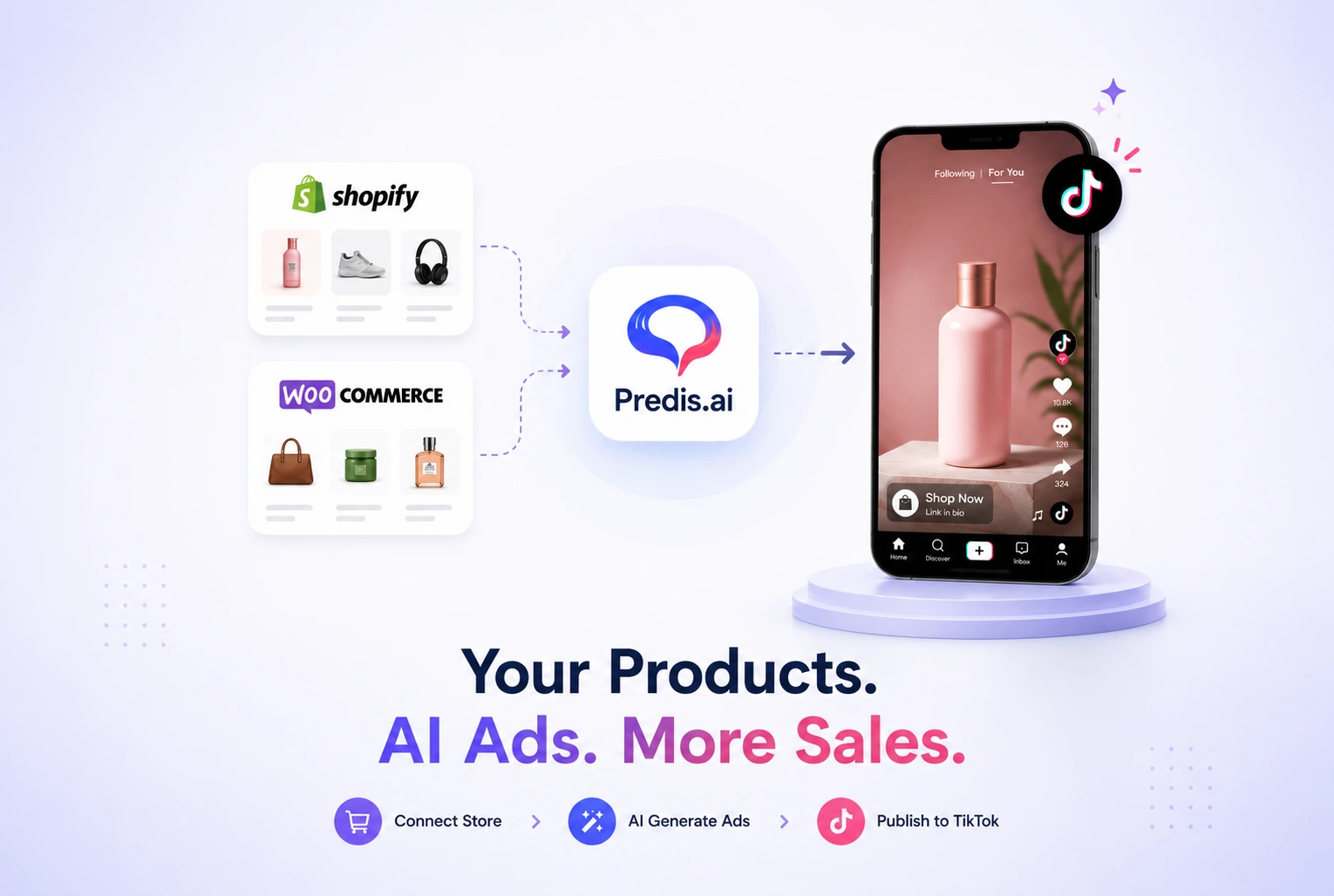
Predis.ai connects directly to your Shopify or WooCommerce store, imports your entire product catalog including images, titles, and descriptions, and generates TikTok-ready video ads in minutes without any video editing experience required, according to Predis.ai’s official product documentation updated in June 2026.
The content velocity problem for e-commerce brands in 2026 is real and expensive. Producing fresh, on-brand TikTok ad creatives daily through traditional workflows requires a video editor, a copywriter, a social media manager, and hours of production time per asset. Most small store owners cannot sustain that pace. The result is either an inconsistent posting schedule that kills organic reach or a reliance on expensive agencies that consume the margin the ads are supposed to generate.
Predis.ai solves this specific problem by combining product catalog integration with AI-powered video generation, caption writing, hashtag generation, and cross-platform scheduling in a single dashboard. Connect your store once and the system pulls your product data automatically for every new ad you create.
According to AI Systems Commerce’s March 2026 review of Predis.ai for Shopify and direct-to-consumer brands, the platform generates multiple variations of posts, carousels, and short videos complete with captions and hashtags in a workflow that starts with a product catalog connection or a single product link.
This guide is the complete step-by-step walkthrough for connecting your WooCommerce or Shopify store to Predis.ai, generating your first TikTok ad from your product catalog, optimising the output for TikTok’s algorithm, and scaling the workflow across your full product range. Every step is based on Predis.ai’s actual features as documented in 2026, not on what the tool promises in its marketing copy.
What Predis.ai Actually Does: The Honest Picture Before You Start
Predis.ai is an AI-native social media content generation and scheduling platform specifically engineered for e-commerce brands who need high-volume, on-brand social media assets and ad creatives without relying on designers, agencies, or hours of manual work, according to AI Systems Commerce’s March 2026 deep operator analysis.
What Predis.ai Does Well
Predis.ai connects to Shopify, WooCommerce, and Wix stores and automatically imports product data to generate platform-ready content, according to AI Tools Directory’s 2026 feature analysis. The platform covers the full social commerce content lifecycle including organic posts, story content, and performance ad creatives, with a specific emphasis on TikTok, Instagram Reels, and YouTube Shorts.
The five capabilities that make Predis.ai genuinely useful for e-commerce TikTok ads are catalog integration that syncs product images, titles, and descriptions automatically, AI video generation that produces TikTok-vertical-format videos complete with text overlays, trending audio tracks, and transitions from product data alone, UGC-style avatar videos that simulate realistic human testimonials without requiring an actual person on camera, a virtual product photoshoot feature that places product images into high-end lifestyle settings using generative AI, and built-in competitor analysis that scans competitor social profiles to identify their best-performing content formats.
Video content generated through Predis.ai reportedly increases engagement rates by 150% compared to static content on the same products, according to Max Productive AI’s January 2026 Predis.ai review. Predis.ai also supports content creation and scheduling across 50 platforms including Facebook, Instagram, TikTok, Pinterest, LinkedIn, Twitter, and YouTube from a single dashboard.
What Predis.ai Does Not Do
Predis.ai is not a media buying platform. It does not manage TikTok Ads Manager campaigns, set budgets, target audiences, or optimise bids. It creates the ad creative and can publish organically, but the paid advertising workflow requires a separate connection to TikTok Ads Manager or Meta Ads Manager for campaign management.
If not customised properly, some generated templates can look slightly stock-heavy compared to custom-shot UGC content, according to Passive Marketer’s April 2026 review of Predis.ai conducted after three days of testing with real product links. The solution is the manual edit step described later in this guide, which breaks the AI-perfect look and adds the authentic imperfection that TikTok’s algorithm rewards.
Heavy users can burn through monthly AI generation credits quickly when experimenting with multiple post variations, according to the same Passive Marketer review. Understanding the credit system before committing to a plan prevents unexpected limitations mid-campaign.
Predis.ai Pricing: What You Can Actually Do at Each Tier
The free plan includes 15 AI-generated posts per month for one brand, according to Max Productive AI’s January 2026 review. This is enough to test the catalog integration and generate your first few TikTok ads before committing to a paid plan.|
| Plan | Monthly Posts | Brands | Key Features | Best For |
| Free | 15 posts | 1 brand | Catalog integration, basic video generation, caption writing | Testing the tool before committing |
| Starter | 100 posts | 1 brand | All free features plus scheduling, competitor analysis, UGC avatars | Solo store owners with one product range |
| Growth | 250 posts | 5 brands | All starter features plus team collaboration, client approval workflow, advanced analytics | Small agencies and multi-brand operators |
| Agency | Custom | Unlimited | White-label, custom AI model training on brand assets, priority support | Agencies managing multiple e-commerce clients |
Step-by-Step: Connecting Your Shopify or WooCommerce Store to Predis.ai
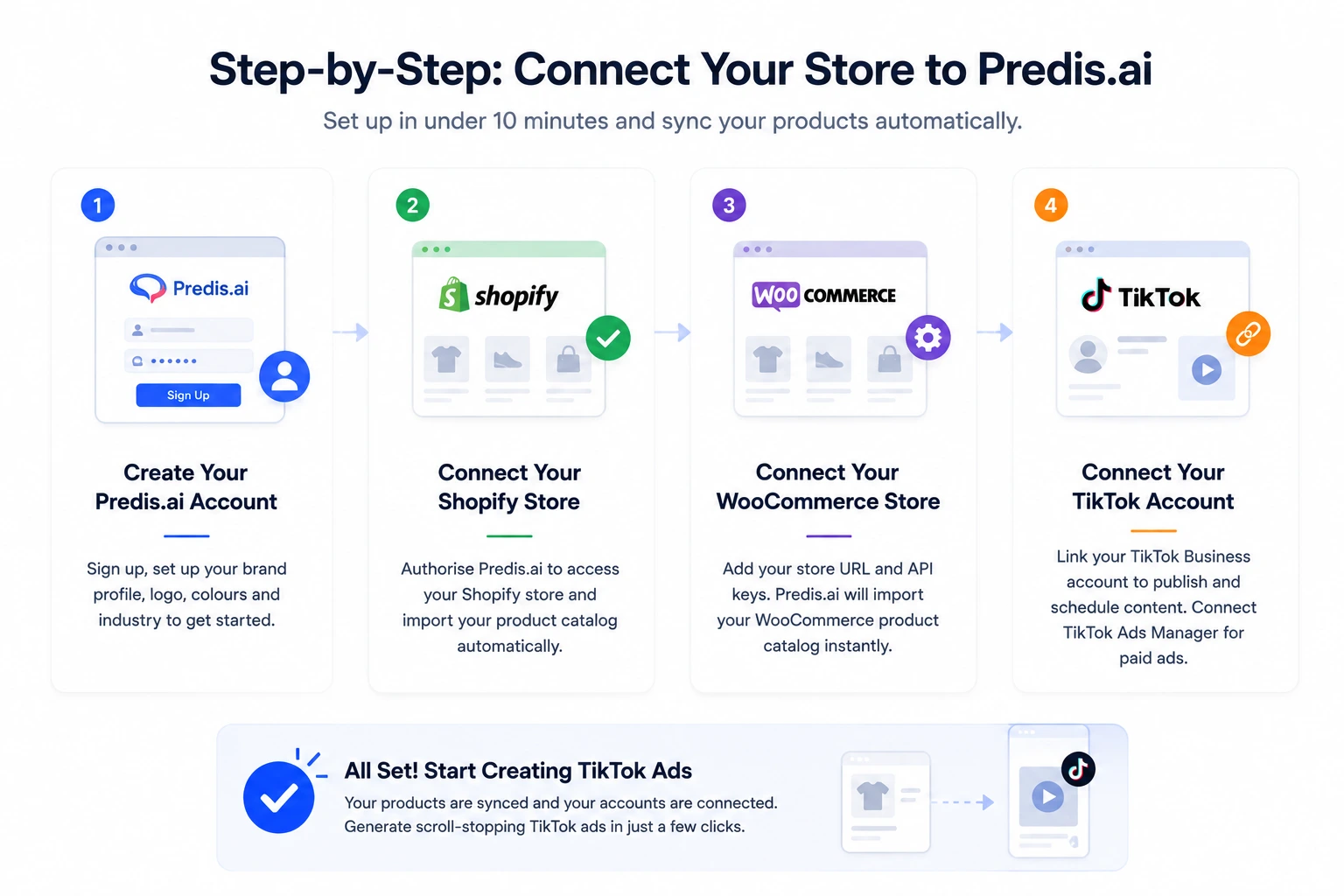
Connecting a Shopify or WooCommerce store to Predis.ai takes under ten minutes and automatically syncs your entire product catalog for use in every ad creative you generate afterward. The connection is done once and the catalog stays updated as you add or remove products from your store.
Step 1: Create Your Predis.ai Account
Go to predis.ai and sign up for a free account. The free plan gives you 15 AI-generated posts per month for one brand, which is sufficient to complete this entire setup and generate your first TikTok ad before you need to decide whether to upgrade.
During account setup, Predis.ai asks you to set up your brand profile. Enter your brand name, upload your logo, specify your brand colours if you have a defined palette, and select your industry category. This brand profile information is what Predis.ai uses to maintain visual consistency across every piece of content it generates for your store. The more specific you are at this stage, the more on-brand the generated content will be from the start.
Step 2: Connect Your Shopify Store
From the Predis.ai dashboard, navigate to the Integrations section. Select Shopify from the available store connections. Predis.ai will redirect you to your Shopify admin to authorise the connection. Once authorised, Predis automatically imports your product catalog including product images, titles, descriptions, and pricing information, according to Predis.ai’s official integration documentation.
The catalog import happens automatically after authorisation. You do not need to manually upload product images or descriptions. Every product in your active catalog becomes immediately available for ad creative generation within the Predis.ai dashboard.
Step 3: Connect Your WooCommerce Store
For WooCommerce stores, the connection process uses your WooCommerce API key rather than a direct OAuth authorisation. In your WordPress admin panel, go to WooCommerce, then Settings, then Advanced, then REST API. Generate a new API key with Read access. Copy the Consumer Key and Consumer Secret.
In Predis.ai’s Integrations section, select WooCommerce and enter your store URL, Consumer Key, and Consumer Secret. Once connected, Predis automatically imports your WooCommerce product catalog with the same product data fields as the Shopify integration.
If your WooCommerce store uses variable products with multiple variants such as different sizes or colours, Predis.ai imports the parent product data and primary product image. You can manually select specific variant images when generating ad creatives for individual variants.
Step 4: Connect Your TikTok Account
In Predis.ai’s Social Accounts section, connect your TikTok Business account. This connection enables Predis.ai to publish generated videos directly to your TikTok profile and to schedule content in advance using Predis.ai’s built-in content calendar.
If you want to run paid TikTok ads with the generated creatives, connect your TikTok Ads Manager account separately. Predis.ai generates the creative assets. TikTok Ads Manager handles campaign setup, audience targeting, and budget management. The two connections are independent and you need both if your goal is paid TikTok advertising rather than organic posting.
Generating Your First TikTok Ad from Your Product Catalog
Once your store is connected and your catalog is imported, generating a TikTok-ready video ad from any product in your catalog takes under five minutes. The process follows the same sequence regardless of whether your store runs on Shopify or WooCommerce.
Select Your Product and Ad Format
From the Predis.ai content creation dashboard, select Create New and choose Video as the content type. The platform prompts you to select the platform you are creating for. Choose TikTok. This ensures the generated video uses TikTok’s vertical 9:16 aspect ratio and respects TikTok’s recommended video length of 15 to 60 seconds for ads.
Next, select your product from the imported catalog. Predis.ai displays all available products from your connected store. Select the product you want to feature. Predis.ai pulls the product image, title, and description automatically. You can edit any of these fields before generation if you want to adjust the messaging for a specific campaign angle.
Choose the video style from the available options: UGC-style testimonial using a AI-generated avatar that simulates a real person reviewing your product, product showcase that features the product image with text overlays and motion effects, or educational explainer that walks through the product’s key benefits in a structured format. UGC-style content has the highest average engagement rate on TikTok in 2026 because it matches the native look of organic content rather than the polished aesthetic of traditional advertising.
Customize the AI-Generated Output
Predis.ai generates the video with automatic text overlays, background music from its licensed music library, captions, and a call-to-action. Review each element before finalising.
The text overlay should be direct and benefit-focused rather than feature-focused. Instead of “Premium leather handbag available in three colours,” the overlay should read “The bag that fits your entire life. Shop now.” Edit the AI-generated overlay if it defaults to feature description rather than benefit communication.
The music selection matters for TikTok specifically because TikTok’s algorithm rewards content that uses trending audio tracks. Predis.ai provides a music library of licensed tracks, but if you have access to TikTok’s trending audio list through TikTok Ads Manager, selecting a currently trending sound increases organic reach from the same creative.
Add the explicit “this is a paid promotion” or “ad” disclosure in the text overlay or caption before publishing. TikTok’s advertising policies require commercial disclosure on all paid content, and FTC guidelines apply to all content that promotes a product or earns an affiliate commission regardless of platform.
The Manual Edit That Makes AI Content Perform
Speed means nothing if the content feels robotic, according to Passive Marketer’s April 2026 review after three days of testing Predis.ai with real product links. AI-generated TikTok videos can look too polished and symmetrical compared to the authentic, slightly imperfect content that performs best on TikTok.
The manual edit step takes under two minutes and significantly improves performance. Trim the first half second of the video so it starts mid-motion rather than from a static frame. This creates the pattern interrupt that stops the scroll. Add one line of text in your own voice to the caption that does not sound like AI wrote it. Adjust the volume of the background music down slightly so it underscores the video rather than competing with the text overlay. These three adjustments break the AI-perfect look and add the authentic imperfection that TikTok’s algorithm rewards, according to Predis.ai’s own best-practices guide published in December 2025.
Advanced Features That Improve TikTok Ad Performance
Virtual Product Photoshoot for Lifestyle-Style Content
Predis.ai includes a virtual product photoshoot feature that uses generative AI to place your product images into high-end lifestyle settings without requiring a physical photography session, according to AI Tools Directory’s 2026 feature analysis. Upload a plain product image and select a lifestyle context such as a kitchen counter, a living room shelf, or an outdoor setting, and Predis.ai generates a realistic product-in-environment image ready for use in video ads.
This feature is particularly valuable for products sold on white-background marketplaces that have no lifestyle photography. A skincare product on a white background becomes a skincare product on a marble bathroom counter surrounded by plants. A kitchen gadget on a white background becomes the same product in use in a bright, modern kitchen. The generated lifestyle context makes the product feel aspirational rather than purely transactional, which improves conversion rates from TikTok ads where lifestyle visual context drives purchase intent more than product specification does.
Competitor Analysis for TikTok Content Strategy
Predis.ai’s competitor analysis feature scans competitor social profiles to identify their best-performing content, providing data-driven insights to help you create content that outperforms what your competitors are already posting, according to AI Tools Directory’s 2026 analysis.
For TikTok ad strategy specifically, use competitor analysis to identify the video formats your competitors’ audiences engage with most, the caption styles that generate the most comments, and the product angles your competitors are not covering. The gaps in competitor content are your content opportunities. A competitor whose TikTok content exclusively shows finished products but never shows the product in use has left the in-use demonstration format open for you to own.
Bulk Generation for Product Launches and Seasonal Campaigns
For a product launch or a seasonal campaign where you need ten to fifteen TikTok ads covering different products or different angles on the same product, Predis.ai’s bulk generation feature creates multiple video variations from your catalog in a single session. Select multiple products or multiple ad styles for the same product, set the parameters once, and let Predis.ai generate all variations simultaneously.
Top-tier e-commerce brands in 2026 have eliminated the content bottleneck by syncing their Shopify or WooCommerce catalogs directly with Predis.ai, allowing them to maintain a high-frequency TikTok posting schedule without the manual production fatigue that kills most solo brand TikTok strategies, according to Stormy AI’s March 2026 analysis of e-commerce social commerce scaling strategies. Read Full Predis.ai Review 2026 Here.
Scheduling and Publishing to TikTok Through Predis.ai
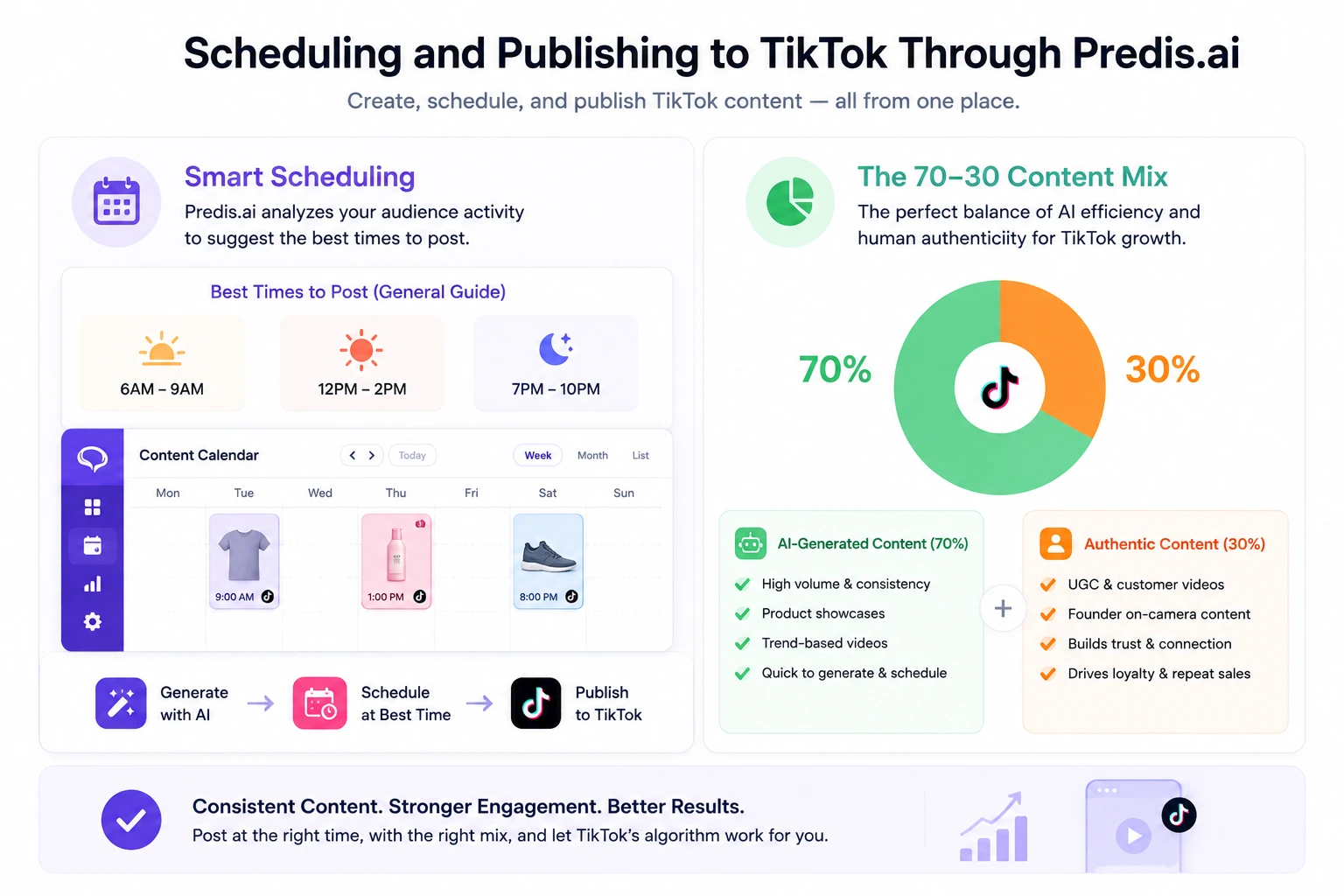
Predis.ai includes a built-in content calendar and scheduling system that publishes generated content directly to connected TikTok accounts at specified times. Unlike social media schedulers that require you to provide finished content, Predis.ai generates the content and schedules it in a single workflow.
Optimal TikTok Posting Times in 2026
TikTok’s algorithm prioritises content that generates engagement in the first 30 to 60 minutes after posting. Posting at times when your specific audience is most active maximises early engagement and increases the probability that TikTok’s For You Page algorithm distributes the content to a wider audience. Predis.ai’s smart scheduling feature analyses your connected account’s historical engagement data to recommend optimal posting times specific to your audience.
As a general starting framework before your account has sufficient data for personalised recommendations, posting between 6am and 9am, 12pm and 2pm, and 7pm and 10pm in your primary audience’s timezone produces the highest average engagement rates for e-commerce TikTok content, according to general TikTok platform data from 2026.
The 70-30 Content Mix for Sustainable TikTok Growth
A sustainable TikTok content strategy for e-commerce brands in 2026 follows a 70-30 balance: 70% AI-generated content for volume and consistency, supplemented with 30% authentic UGC or founder-created content for trust and authenticity, according to Stormy AI’s March 2026 analysis of e-commerce social commerce strategies.
Predis.ai handles the 70% efficiently. The 30% authentic content, videos where the store owner or a real customer appears on camera, cannot be replaced by AI-generated avatars for long-term trust building. The combination of AI-generated volume content and authentic personal content produces better results than either approach alone because the AI content maintains posting frequency while the authentic content builds the human connection that drives repeat purchase and brand loyalty.
Common Mistakes When Using Predis.ai for TikTok Ads
Skipping the Manual Edit Step
The most common mistake is publishing the AI-generated video without any manual adjustment. Predis.ai generates technically correct content. TikTok rewards content that feels human and native to the platform. Spending two minutes on the three manual edits described earlier, trimming the first frame, adjusting music volume, and adding one authentic caption line, consistently improves performance metrics compared to publishing unedited AI output.
Using the Same Template Style for Every Product
Predis.ai offers multiple video styles and generating every ad in the same format reduces the learning signal TikTok’s algorithm receives about what your audience responds to. Generate two or three different style variations for each product in your first batch, run them as organic posts, identify which format generates the most saves and shares, and then use that format as your default for paid ad creatives.
Ignoring the Caption and Hashtag Layer
Predis.ai generates captions and hashtags automatically, but the auto-generated hashtags are often broad and high-competition. Replace two or three of the auto-generated hashtags with niche-specific hashtags that have lower competition but directly match your product category. TikTok’s search functionality in 2026 means hashtags drive discovery from search as well as from the For You Page algorithm, making hashtag specificity more valuable than hashtag volume.
Not Verifying Commercial Disclosure Compliance
Every TikTok video that promotes a product your brand sells requires a commercial disclosure under both TikTok’s advertising policies and FTC guidelines. The disclosure must be clear and conspicuous, meaning it appears in the video or caption where a viewer would notice it before engaging with the commercial claim. Predis.ai does not automatically add commercial disclosures to generated content. This step requires your explicit addition before publishing.
CONCLUSION:
Predis.ai removes the single biggest obstacle most small e-commerce brands face on TikTok in 2026: the time and skill required to produce high-volume video ad content consistently. By connecting your Shopify or WooCommerce catalog once, you gain access to a generation pipeline that turns any product in your store into a TikTok-ready video ad, complete with captions, hashtags, and scheduling, in under five minutes per creative.
The workflow is straightforward. Connect your store. Import your catalog. Select your product and ad format. Generate multiple variations. Apply the three-step manual edit. Publish on a consistent schedule using Predis.ai’s content calendar. Run the highest-performing organic creative as a paid ad through TikTok Ads Manager.
The platform has genuine limitations. It is not a media buying tool. Over-reliance on one template style reduces the algorithm’s learning. And no AI tool eliminates the need for some authentic human content in your TikTok mix.
But for the specific problem of content velocity, producing enough TikTok ad creatives to maintain a consistent presence without a production team or an agency budget, Predis.ai is the most direct solution available to small e-commerce brands in 2026.
If you want to test it before committing, Predis.ai’s free plan gives you 15 AI-generated posts per month for one brand with full catalog integration included. That is enough to connect your store, generate your first TikTok ads, and decide whether the workflow makes sense for your operation before spending anything.
FAQs
Q: Can Predis.ai connect to WooCommerce stores?
A: Yes. Predis.ai connects to WooCommerce stores using your WooCommerce REST API key. In your WordPress admin, go to WooCommerce, then Settings, then Advanced, then REST API to generate a Consumer Key and Consumer Secret with Read access. Enter these credentials in Predis.ai’s Integrations section along with your store URL. Once connected, Predis.ai automatically imports your full product catalog including images, titles, and descriptions for use in ad creative generation.
Q: How does Predis.ai generate TikTok ads from a product catalog?
A: After connecting your Shopify or WooCommerce store, Predis.ai imports your product catalog automatically. To generate a TikTok ad, select a product from the imported catalog, choose TikTok as the target platform and video as the content type, select an ad style such as UGC testimonial, product showcase, or educational explainer, and Predis.ai generates a vertical-format video complete with text overlays, licensed background music, captions, hashtags, and a call to action. The entire generation process takes under five minutes per creative.
Q: What is the free plan limit on Predis.ai?
A: Predis.ai’s free plan includes 15 AI-generated posts per month for one brand, according to Max Productive AI’s January 2026 review of Predis.ai pricing. The free plan includes catalog integration with Shopify, WooCommerce, and Wix, basic video generation, and caption writing. It does not include advanced features like competitor analysis, UGC-style avatars, the virtual product photoshoot feature, or the client approval workflow, which are available on paid plans.
Q: Does Predis.ai publish directly to TikTok?
A: Yes. Predis.ai connects to TikTok Business accounts and publishes generated videos directly to your TikTok profile through its built-in scheduling system. You can schedule content in advance using Predis.ai’s content calendar and set specific posting times. For paid TikTok advertising campaigns, you need to connect TikTok Ads Manager separately. Predis.ai handles creative generation and organic publishing. TikTok Ads Manager handles paid campaign setup, audience targeting, and budget management.
Q: Is Predis.ai worth it for a small e-commerce store?
A: Predis.ai is worth testing for small e-commerce stores specifically because the free plan includes full catalog integration and 15 posts per month, enough to evaluate whether the workflow fits your operation before committing to a paid plan. The platform solves the content velocity problem for solo store owners who cannot sustain daily TikTok content production through traditional workflows. Its limitations include a lack of media buying functionality, potential over-reliance on templates if the manual edit step is skipped, and a credit system that heavy users can exhaust quickly. Testing on the free plan before upgrading is the recommended approach.